.png)

MCP stands for Model Context Protocol. If that means nothing to you, good. You are the audience for this post.
Most of the writing about MCP is aimed at developers. It talks about tool definitions, server implementations, and JSON-RPC transport layers. That is useful if you are building MCP servers. It is useless if you are a RevOps lead, a marketing manager, or a founder trying to understand why your AI tools suddenly got a lot more capable.
Here is what MCP actually means in plain terms, why it matters for business operations, and what it changes about how you use AI at work.
AI assistants are smart but isolated. ChatGPT can write a great email, but it cannot look up the contact in your CRM first. Claude can analyse data brilliantly, but it cannot pull the data from your database without you copying and pasting it in. Every AI interaction starts from zero context unless you manually provide it.
This is why most teams use AI as a slightly better autocomplete. The AI is capable of far more, but it has no way to reach your actual business data and tools.
MCP fixes this. It is a standard protocol that lets AI assistants connect directly to external tools and data sources. Think of it as a universal adapter. Before MCP, every AI-to-tool connection required a custom integration. After MCP, any AI assistant that supports the protocol can connect to any tool that exposes an MCP server.
The analogy that actually works: USB. Before USB, every device had its own proprietary connector. Printers, keyboards, cameras, scanners. You needed a different cable and driver for each one. USB gave everything a single standard port. MCP does the same thing for AI-to-tool connections.
Without MCP, your AI workflow looks like this: open your CRM, find the contact, copy the relevant data, paste it into Claude, ask your question, get an answer, then manually go back to the CRM to update the record. Every step is manual. Every context switch costs time and loses information.
With MCP, the same workflow looks like this: ask Claude to check the contact's enrichment status, review their recent activity, and update the deal notes with a summary. The AI connects to your CRM, your enrichment cache, and your project tracker through MCP, does the work across all three systems, and reports back. One conversation. No tab switching. No copy-pasting.
The practical difference is not just speed. It is context. When the AI can see your CRM data, your enrichment results, your project history, and your documentation at the same time, it makes connections a human would miss (or would take an hour to piece together manually). It can spot that a contact who just changed job titles was already in your pipeline from a previous campaign, cross-reference their company's funding data from your enrichment cache, and flag the opportunity before anyone on your team notices.
The obvious question: "Is this not just another integration layer? How is this different from Zapier or Make?"
It is fundamentally different, and the distinction matters.
Zapier connects tools with rigid, predefined automations. "When a form is submitted, create a HubSpot contact and send a Slack notification." The workflow is fixed. It does exactly what you configured, every time, regardless of context. If the form submission is from an existing customer who already has an open deal, Zapier does not know or care. It runs the same steps.
MCP connects tools to an AI agent that understands context. The agent can read data from multiple systems, reason about what it sees, and decide what to do based on the full picture. It is the difference between a train (fixed route, no deviation) and a driver (understands the destination, adapts the route based on conditions).
This matters for operations because operational work is full of judgement calls. Should this lead be routed to sales or nurture? That depends on their enrichment data, their engagement history, and whether they match your ICP. A Zapier workflow either routes everything the same way or requires you to build increasingly complex conditional branches that break when reality does not match your assumptions.
An AI agent with MCP access looks at the enrichment data, checks the engagement history, compares against the ICP criteria in your documentation, and makes a judgement call. And when the criteria change, you update the documentation, not the automation logic.
MCP is not theoretical. It is live and growing fast. The current ecosystem includes connectors for most of the tools a B2B operations team uses daily.
CRM and sales tools. HubSpot, Salesforce, and most major CRMs have MCP servers available. Your AI agent can read contacts, deals, and activities, update properties, and create records.
Data and enrichment. Databases like Postgres connect natively. If you are running an enrichment cache, the AI can query it directly. Clay tables can be triggered and read through API-backed MCP connections.
Project management. Linear, Notion, ClickUp, Asana. The agent can create issues, update statuses, and read project context without you switching tools.
Communication. Slack, Gmail, Google Calendar. The agent can search conversations, draft emails, and check scheduling availability.
Documentation. Notion, Google Drive, Confluence. The agent can search your knowledge base, read documents, and update pages.
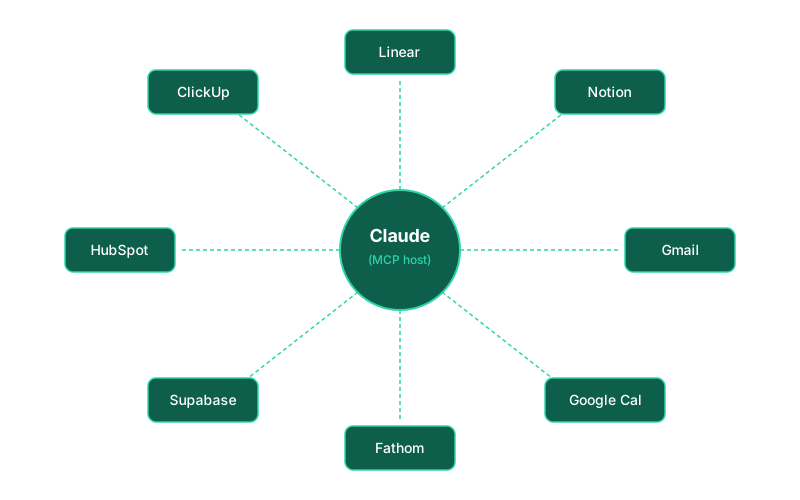
The gap is narrowing every month. Six months ago, connecting an AI agent to your CRM required custom API code. Today, it is a configuration step. The protocol is standardised. The connectors are open source. The barrier to entry is time and willingness, not technical skill.
RevOps is where MCP has the most immediate impact, because RevOps lives at the intersection of every tool in the GTM stack. The whole job is connecting data across systems, maintaining consistency, and making sure nothing falls through the cracks. That is exactly what an AI agent with MCP access does well.
Enrichment workflows. Instead of building complex Clay table chains with HTTP request columns and webhook callbacks, you can have the AI agent query your operational data store directly, check what needs enriching, trigger the enrichment, and cache the results. The waterfall logic (cheapest provider first, escalate if needed) can live in your documentation rather than in Clay column configurations.
Pipeline hygiene. The agent can review deal stages daily, flag stale deals, check for missing properties, and create follow-up tasks in your project tracker. Not as a scheduled Zapier workflow that sends the same Slack notification every morning, but as a contextual review that adapts based on what it finds.
Reporting and analysis. Instead of building dashboards and waiting for someone to look at them, the agent can proactively surface insights. "Pipeline coverage dropped below 3x this week, driven by three deals that slipped to next quarter. Here is what changed." That requires reading from the CRM, the project tracker, and the forecast model in a single query. MCP makes that possible.
Cross-system consistency. The number one RevOps headache is data existing in slightly different forms across multiple tools. The agent can audit for inconsistencies across your CRM, enrichment cache, and documentation, then fix them or flag them for review.
You do not need to connect everything at once. Start with the connection that removes the most manual work from your day.
For most operations teams, that is CRM plus project management. Connect those two, and the agent can create tasks from CRM data, update deal notes from project context, and keep both systems in sync without you acting as the middleware.
The next connection depends on your pain point. If you spend time on enrichment and data quality, connect your database. If you lose context between meetings and follow-ups, connect your calendar and email. If your documentation is scattered, connect your knowledge base.
Each connection makes the agent more useful because it can see more context. This is the compounding effect described in the AI-first operations guide. The agent with access to two tools is useful. The agent with access to six tools is transformative, because it can make connections across all of them that no single-tool automation could.
The practical advice: start with two connections. Use them for a month. Add a third when you feel the limitation of the agent not being able to see something it needs. Expand based on actual friction, not theoretical completeness.
This post is part of a series on building AI-first operations. Related: Building a Clay Enrichment Cache That Saves 40-60% on Lookups, Why We Built an Operational Data Store Instead of Making HubSpot Do Everything.

%20(1).jpeg)