.png)


Every Clay table you run costs money. Every row that hits an enrichment provider, whether that is Clearbit, Apollo, or Clay's own credits, costs money. And if you are running outbound at any kind of scale, you are almost certainly enriching the same domains and contacts multiple times across different tables, campaigns, and verticals.
Most teams do not think about this. They build a new Clay table for each campaign, each ICP segment, each client vertical. Every table runs its own enrichment lookups from scratch. The same company gets enriched in January for the banking campaign, again in March for the enterprise push, and again in June when someone asks "what do we know about this account?" Three lookups. Three charges. Same data.
The fix is an enrichment cache. A persistent layer that sits between your Clay tables and your enrichment providers, stores every result, and serves cached data before making a new API call. Once you have enriched a domain, you never pay for it again until the data actually goes stale.
We built one. It saves 40-60% on enrichment costs depending on overlap between campaigns. Here is how it works and how you can build the same thing.
Clay is excellent at what it does. You define your enrichment logic, set up your waterfall columns, and it runs the lookups. The problem is that each Clay table is self-contained. There is no shared memory between tables. Table A does not know that Table B already enriched the same 500 domains last month.
This means your enrichment spend scales linearly with the number of tables you run. More campaigns, more verticals, more clients (if you are running Clay for multiple accounts), more cost. The data does not compound. Every table starts from zero.
The second problem is freshness. Not all enrichment data needs to be real-time. A company's employee count from three months ago is probably still accurate. Their funding round from last week might not be. But without a cache layer, you have no way to distinguish between "this data is stale and needs refreshing" and "this data is fine, do not waste a credit on it."
The concept is simple. Before any Clay table hits an enrichment provider, it checks a cache. If the data exists and is fresh enough, it uses the cached version. If not, it makes the API call, stores the result, and moves on.
In practice, this means a Postgres database (we use a managed instance) with a table for each enrichment type: company data, contact data, technographics, funding, whatever you are enriching. Each row has the enrichment result plus a timestamp for when it was last refreshed.
The flow looks like this:
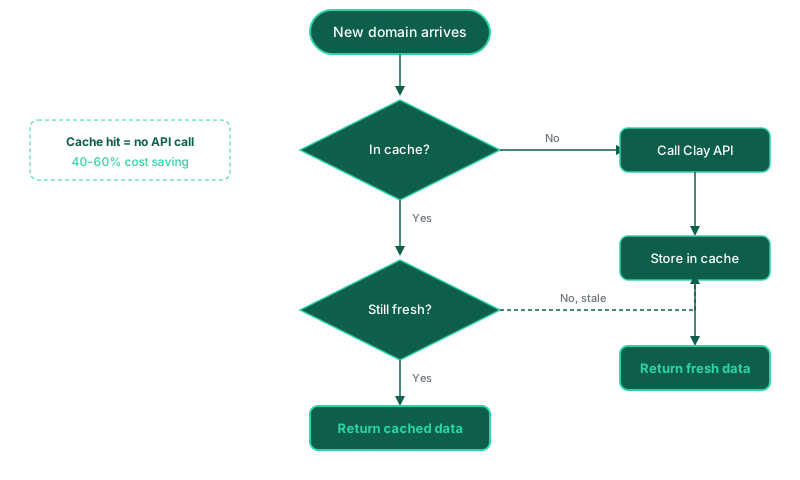
The TTL is where it gets interesting. Not all data types have the same shelf life. Company firmographics (employee count, industry, revenue range) can safely cache for 90 days. Contact details (email, job title) might need a 30-day window because people change roles. Technographics (what tools they use) could be 60 days. Funding data should refresh more often if you are targeting recently funded companies.
You set the TTL per enrichment type, and the cache handles the rest.
The savings depend entirely on how much overlap exists in your enrichment targets. If you are running completely unique lists every time with zero domain overlap, a cache does nothing for you. But that is not how most teams operate.
In practice, we see 40-60% cache hit rates across campaigns. Here is why the overlap is higher than you think:
Same TAM, different angles. If you are selling into mid-market SaaS companies, your banking vertical campaign, your enterprise security campaign, and your product-led growth campaign all draw from largely the same universe of companies. Different segments of it, but the underlying company data overlaps heavily.
Re-enrichment for freshness. Teams re-run enrichment on their existing CRM contacts periodically to catch job changes, new funding rounds, or updated technographics. Without a cache, every re-enrichment is a full-price lookup even if nothing changed.
Client overlap (for agencies and consultancies). If you run Clay tables for multiple clients in similar markets, the same companies appear across client accounts. The cache does not care which client triggered the lookup. It just knows whether the domain has been enriched recently.
At scale, this adds up fast. If you are spending $2,000/month on enrichment and your cache hit rate is 50%, that is $1,000/month saved. Over a year, $12,000. For the cost of a managed Postgres instance (which can run on a free tier for most teams), that is an excellent return.
The cache also changes how you structure your enrichment waterfalls. In a standard Clay setup, you might run Clearbit first because it has the best data quality, then fall back to Apollo for anything Clearbit missed. But Clearbit credits cost more than Apollo credits.
With a cache layer, you can restructure the waterfall to try the cheapest provider first. If the cheap provider returns good data, cache it and move on. Only escalate to the expensive provider for domains where the cheap source came up empty or returned low-confidence data.
This is not about sacrificing data quality. It is about not paying premium rates for data you could have got from a cheaper source. The cache remembers which provider returned the best result for each domain, so future lookups know exactly where to go first.
The practical structure:
Over time, your cache learns which providers work best for which types of companies. Tech companies might get better results from one provider. Manufacturing companies from another. The cache stores this, so your waterfall gets smarter as it grows.
You do not need to be a database engineer to set up an enrichment cache. The components are straightforward.
The database. A managed Postgres service with a free or low-cost tier. Create a table with columns for domain, enrichment type, enrichment data (stored as JSON), provider, last refreshed timestamp, and TTL days. That is the whole schema.
The lookup endpoint. A serverless function that receives a domain and enrichment type, checks the cache table, and returns either the cached data or a "not found" response. Clay calls this via an HTTP request column before running enrichment.
The write-back. A webhook that fires after Clay completes an enrichment lookup, sending the result to the cache for storage. This can be a simple serverless function that inserts or updates a row.
The TTL check. Part of the lookup function. Compare the "last refreshed" timestamp against the TTL for that enrichment type. If the data is older than the TTL, treat it as a cache miss and let Clay run the enrichment fresh.
The whole thing can be set up in an afternoon if you are comfortable with serverless functions. If not, an AI agent can generate the code for the lookup function, the write-back webhook, and the database migration. You review it, deploy it, and you are running.
The cache gets more valuable over time. Every new domain you enrich adds to the cache. Every campaign you run increases the probability of future cache hits. After six months of running outbound across multiple verticals, your cache hit rate will be significantly higher than it was in month one.
What does not compound: the cache cannot tell you whether the data is still accurate, only whether it is within the TTL window. A company that was 50 employees when you cached it three months ago might be 200 employees now. The TTL is your safety net, but it is not perfect. For time-sensitive use cases (like targeting companies that just raised funding), you want shorter TTLs or manual refresh triggers.
The other thing that does not compound is data quality from the source providers. If Clearbit returns bad data for a domain, caching that bad data just means you serve bad data faster. Build in a confidence score or quality flag so you can identify and refresh low-quality cache entries.
The enrichment cache is one layer of a larger operational data store. The same database that caches enrichment data can also store your unified company and contact graph, webhook event logs, and automation state. The cache is usually the first thing you build because the ROI is immediate and obvious, but it is not the whole picture.
If you are already thinking about moving from a CRM-centric architecture to a data-centric one, the enrichment cache is a natural starting point. It gives you a reason to set up the database, a measurable win to justify the investment, and a foundation to build on.
For a deeper look at how enrichment fits into the full Clay data enrichment strategy, including table design patterns and multi-vertical templating, that is covered in our enrichment intelligence guide.
This post is part of a series on building AI-first operations. Related: Why We Built an Operational Data Store Instead of Making HubSpot Do Everything, What MCP Actually Means for Business Operations.

%20(1).jpeg)